

Skip to content

AgentivX RealtyOS

The AI back office for real estate teams.

RealtyOS scores every new lead the moment it arrives. Eight AI agents draft replies, listing launches, and client updates in one click, and propose contract deadlines for your review. Your team approves anything a client will see, and every step is logged.

The demo uses a fictional brokerage. No sign-up, and nothing is sent to real people.

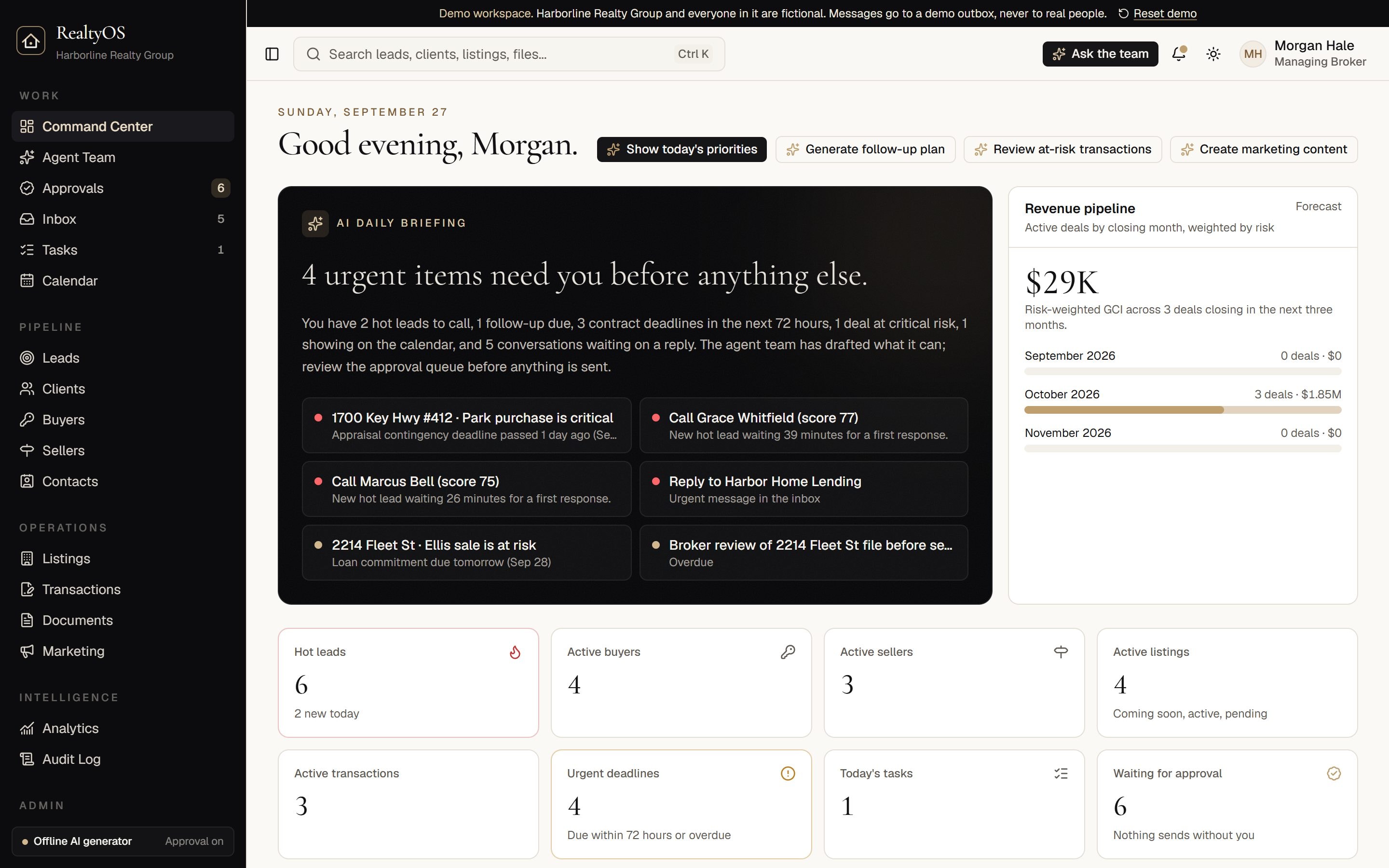
The RealtyOS Command Center: a daily briefing, urgent items, and a risk-weighted revenue pipeline

Built for solo agents, teams, brokerages, and independent transaction coordinators.

The platform

It works like adding six specialists to your team.

Each one drafts or tracks the work that slips when you are with clients: fast replies, listing launches, deadlines, updates, paperwork, and planning. You stay the one who decides.

  1. 01

    AI Sales Assistant

    Scores every new inquiry with reasons you can read, drafts a reply in one click while the lead is still warm, and tells you who to call first.

  2. 02

    AI Marketing Coordinator

    Drafts MLS copy, launch plans, open house campaigns, and listing website copy in your brand voice, checked for Fair Housing language.

  3. 03

    AI Transaction Coordinator

    Proposes the deadlines in each contract for your approval, watches every milestone, and flags files at risk before a deadline slips.

  4. 04

    AI Client Concierge

    Keeps buyers and sellers informed with drafted updates, next steps, and reminders you approve in one click.

  5. 05

    AI Compliance Assistant

    Tracks buyer agreements, reviews documents and copy, and routes anything sensitive to your broker.

  6. 06

    AI Business Coach

    Builds your daily focus and weekly review from your own pipeline: what to do next and which deals are likely to close.

Human in the loop

Nothing reaches a client until a person says yes.

  • Edit a draft, approve it, and it sends. Or send it back with a note.
  • Compliance-sensitive items wait for a broker's sign-off.
  • Text consent, opt-outs, and quiet hours are checked again at send time, not only when the draft was written.
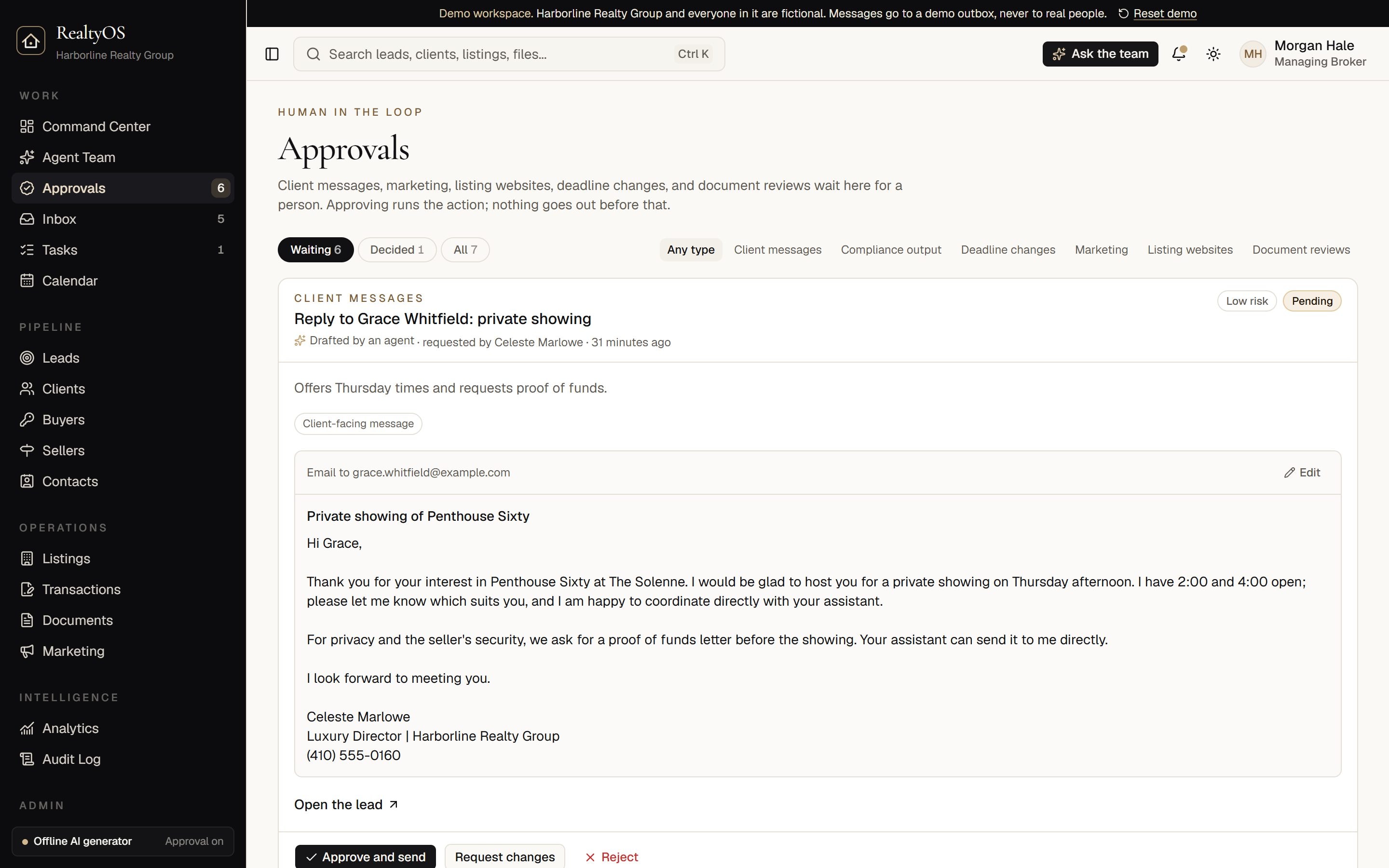
The approval queue with drafted client messages waiting for review
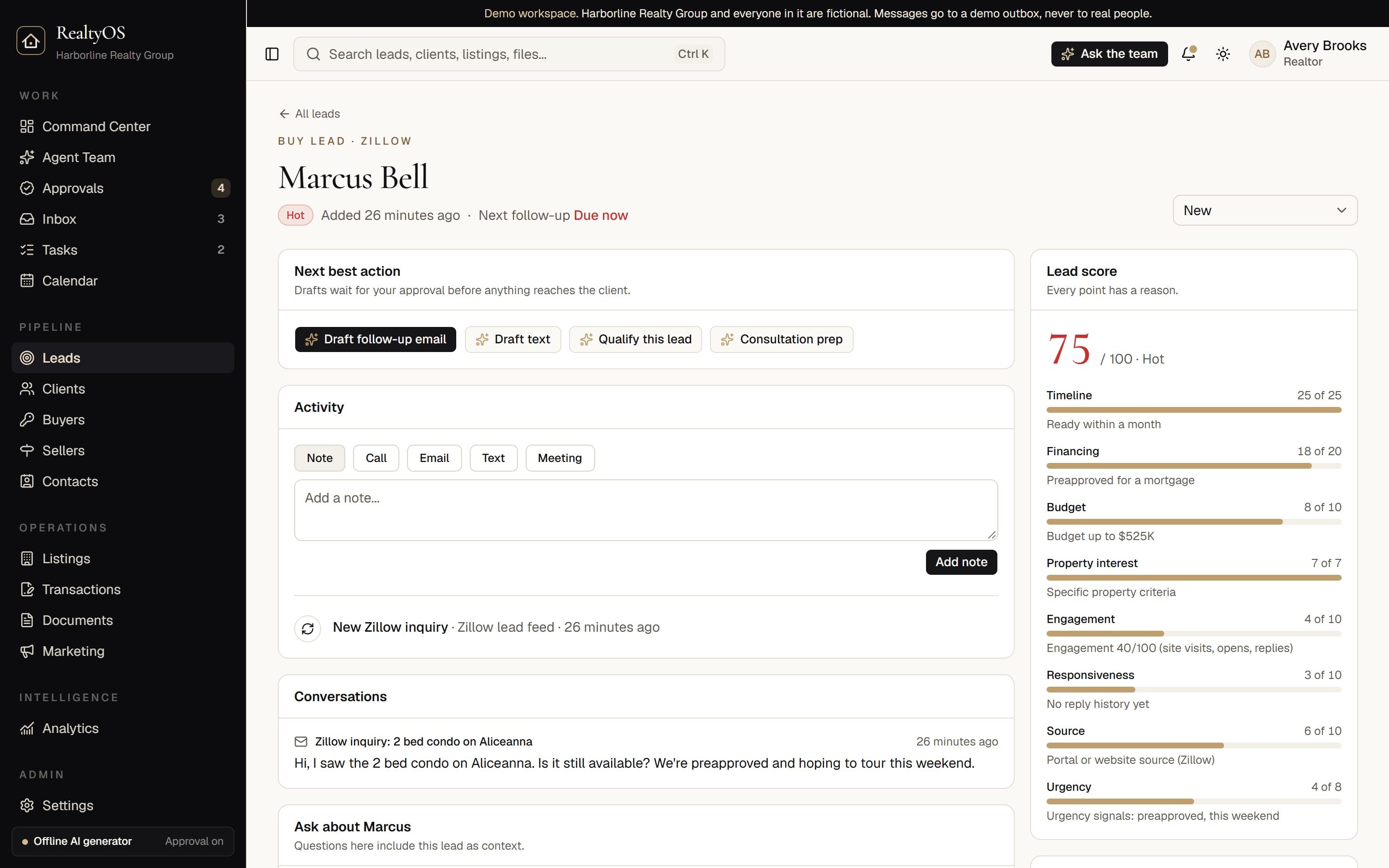
A lead record with an explainable score, conversation, and suggested next steps

Speed to lead

Reply first, with the right words.

Every new lead is scored on arrival, and you can see exactly why: timeline, financing, budget, source, and the urgency in their own message. One click has the Lead Conversion Agent draft a reply that answers what they asked and, if they want to see a home, suggests tour times for you to confirm before it goes out.

Open a lead in the demo

Listing Studio

Listing websites that sell the feeling, with a preflight that protects the brokerage.

Build a cinematic or classic property site from the listing record. Before anything goes live, Launch Preflight checks it and hands your broker a clear release decision.

Launch Preflight

  • Copy matches the property record: beds, baths, and square feet
  • Fair Housing language review
  • Rights confirmed for every gallery photo
  • Disclosure for any image marked AI-generated
  • Brokerage identified, with its license number on file
  • Equal Housing Opportunity statement

A failing item blocks the release. Your broker releases the site, sends it back with a note, or rejects it, and the decision is logged.

Contract to close

Every deadline, without the sticky notes.

Upload a contract and, in one click, the Transaction Coordinator Agent proposes its deadlines as milestones for your review. Each file carries a risk status that updates every morning, so the deal that needs you today is at the top of the list.

  • Deadlines pulled from the contract, applied only after you approve them
  • Closing and document checklists for every file
  • Drafted updates for buyers, sellers, lenders, and title

2214 Fleet St · Ellis sale

Closing October 23 · Example file

At risk
  1. Earnest money deliveredDone
  2. Home inspection contingencyDone
  3. Appraisal contingencyTomorrow
  4. Loan commitmentIn 6 days
  5. Final walk-throughOct 22
  6. SettlementOct 23

Deadline extraction is for review by your broker. It is not legal advice.

The agent team

Eight agents, each with a narrow job.

Ask in plain language and RealtyOS matches the question to one of the agents' tasks, or press the button on any record. Each agent works from the facts in your records and is instructed to say what is missing instead of guessing.

AI Sales Assistant

Lead Conversion Agent

Tells you who to call first, qualifies each lead, and drafts a specific follow-up in one click.

4 tasks

AI Client Concierge

Client Concierge Agent

Keeps every client informed: status updates, next steps, reminders, and onboarding, all drafted for your approval.

5 tasks

AI Marketing Coordinator

Listing Launch Agent

Gets listings market-ready: checklists, MLS copy, launch plans, open house promotion, website copy, and seller updates.

7 tasks

AI Transaction Coordinator

Transaction Coordinator Agent

Tracks every contract-to-close deadline, catches missing documents and signatures, and flags deals at risk before they slip.

6 tasks

AI Marketing Department

Marketing Agent

Drafts listing campaigns, social posts, email, texts, newsletters, video scripts, and ads in your brand voice, for your team to approve and post.

4 tasks

AI Compliance Assistant

Compliance Assistant Agent

Tracks buyer agreements and required paperwork, reviews documents and copy, and routes anything sensitive to the broker.

4 tasks

AI Market Analyst

Market Intelligence Agent

Neighborhood summaries, CMA support notes, pricing signals, and market reports, from a labeled sample dataset until an MLS feed is connected.

3 tasks

AI Business Coach

Revenue Growth Coach Agent

Daily priorities, weekly business reviews, follow-up gaps, forecasts, and the revenue actions that matter most.

5 tasks

Governance

Built for the rules you already work under.

A person approves client-facing work
Emails, texts, marketing, and listing websites wait in one approval queue. Approving a message sends it and approving a website publishes it; approved marketing is posted from your own tools.
Fair Housing checks
Drafts are scanned for preference and steering language. Phrases on the blocking list cannot be approved until they are edited out.
Consent and quiet hours for texts
Texts need recorded consent, never go out between 8 p.m. and 8 a.m. in your time zone, and STOP opts a person out at once.
Buyer agreements tracked
Showings booked without a signed written agreement are flagged with a task, and a reminder to the client can be drafted in one click for broker approval.
Your data stays yours
Each brokerage is isolated at the database level with row-level security, and people only see what their role allows.
An audit log you can export
Every agent run, approval, edit, and message is recorded in an append-only log that owners, broker admins, and team leads can filter and export as CSV.
How RealtyOS handles data and compliance

Packages

Every package includes all eight agents.

Every feature is in every package. Choose by how many people will use it and how much help you want getting started.

Solo Agent

One Realtor who wants an AI back office

$149/ month

1 user · $124 a month on an annual agreement, paid up front

No setup fee

  • All eight AI agents with approval gates
  • Leads, clients, listings, and transactions
  • Listing Website Studio with Launch Preflight
  • Email and text drafts held for your approval
  • Private calendar feed and daily briefing
Start a 14-day trial

Team

Most teams

Teams that share leads and need a lead's view of everything

$499/ month

Up to 10 users; extra users $39 a month each, then $20 from the 21st, invoiced separately · $416 a month on an annual agreement, paid up front

$500 one-time onboarding (waived on a prepaid annual agreement)

  • Everything in Solo Agent
  • Team lead view, lead assignment, and reassignment
  • Shared approval queue with role-based rules
  • Team analytics and weekly business review
  • Onboarding session and contact import
Book a walkthrough

Brokerage

Brokerages that need oversight, compliance review, and audit

From$1,499/ month

Up to 50 users; each extra user $20 a month, invoiced separately · $1,249 a month on an annual agreement, paid up front

$2,500 one-time onboarding ($5,000 with a dedicated deployment on your domain)

  • Everything in Team
  • Broker Portal with compliance and file review
  • Broker-only approval rules and disclaimers
  • Audit log export (CSV)
  • Optional dedicated deployment on your domain, with a rollout plan
Talk to AgentivX

Transaction Coordinator

Independent TCs who manage files for several agents

$149/ month

1 coordinator · $124 a month on an annual agreement, paid up front

No setup fee

  • All eight AI agents, led by Transaction Coordinator and Compliance
  • Contract deadlines proposed for your approval
  • Risk board across every active file
  • Client, lender, and title update drafts
  • Closing and document checklists
Start a 14-day trial

Solo Agent and Transaction Coordinator include a 14-day trial. Prices are in US dollars and exclude any texting or email provider fees. Online checkout bills monthly; annual agreements and setup fees are invoiced separately.

For brokerages: start here

Listing Launch Preflight pilot

One brokerage, one approved listing checklist, 10 to 20 consented listings. Every listing gets a preflight packet: facts checked against the property record, Fair Housing language review, photo rights and AI-imagery disclosure, and a recorded broker release decision. If the brokerage subscribes within 60 days, the pilot fee is credited toward its setup fee.

  • Median broker review time from the approval records, compared with the baseline you give us for today's process
  • Every issue the broker confirms, tracked to its rule and source
  • A recorded approval for every listing that goes live

From $4,000

Four weeks, fixed scope

Scope a pilot

Questions

What people ask first.

Does RealtyOS send anything on its own?
No. Agents draft. Anything a client, lead, or the public will see waits in the approval queue until someone on your team approves it, and compliance-sensitive items wait for your broker's sign-off.
Which AI does it use, and is my data used for training?
RealtyOS works with Anthropic's Claude or OpenAI through their business APIs, and only sends the records a task needs. Both providers state that API data is not used to train their models by default; review their current terms for your plan. Without a provider key, RealtyOS runs an offline generator so you can evaluate everything first.
Does it replace my CRM or transaction software?
It can be your CRM, leads, and transaction workspace, or run next to the tools you already use. You can start by importing your contacts from a CSV file and adding your active files, then bring in the agents one workflow at a time.
Does it connect to the MLS?
Not directly yet. Listing details are entered by your team, and MLS copy is drafted for you to paste. MLS integrations depend on each MLS's licensing and are on the roadmap.
Is any of this legal advice?
No. RealtyOS flags items for review and explains why, but it does not give legal, tax, lending, or brokerage advice. Your broker and attorney make those calls, and the software is built to route those questions to them.
Can a brokerage put its own brand on it?
Yes. Listing websites on the classic template carry your workspace's logo and accent color. The Brokerage package adds a dedicated deployment on your own domain, with a rollout plan for your offices.
What is in the live demo?
A fictional Baltimore brokerage with leads, listings, transactions, documents, and a full approval queue. Sign in as the broker, a team lead, an agent, or a transaction coordinator to see each view. Messages go to a demo outbox and never reach real people.

See it with your own listings.

A thirty-minute walkthrough of your listing checklist and approval rules, with a trial workspace you can keep testing afterward.